How to check whether a review was really removed
You should never have to take a provider’s word for it — ours included. A removal is a fact about a public web page, which means you can check it in under a minute. Here are the two ways to do it, and the handful of things that make a live review look gone when it is not.
On this page
- The review link tells you whether that specific review still exists.
- Searching the review text on the listing tells you what a shopper actually sees — which is the check that matters.
- Open any listing instantly with amazon.com/dp/ASIN. Swap the domain for the marketplace you are checking.
Why you should check it yourself
Pay-per-removal only works if both sides can look at the same thing and agree on what they see. If you cannot verify a removal independently, the billing is built on trust alone — and trust is not a method.
So treat every removal report, from any provider, as a claim to be checked. It takes less than a minute per review, and once you have done it a few times you will do it without thinking.
Method 1: open the review link
Every Amazon review has its own permanent URL. If you reported the review, you have that link — it is what you submitted.
Open it in a browser. What you get back tells you the answer:
- The review is still there. It has not been removed. That is unambiguous.
- An error page, or you land on the product instead. The review no longer exists at that address.
Two things to watch. Open the link on the same marketplace it came from — a review on amazon.de does not resolve on amazon.com. And give a very recent removal a little time: the link can stop working before every cached copy catches up.
This method is quick and precise, but it only answers a narrow question: does that URL still work. The next one answers the question your buyers actually pose.
Method 2: search for it on the listing
This is the check I trust more, because it tests what a shopper sees rather than what a URL returns.
- Open the product page and go to the customer reviews.
- Find the “Search customer reviews” box above the review list.
- Paste a distinctive phrase from the review — part of the title, or an unusual sentence from the body.
- Search. No results means the review is no longer on that listing.
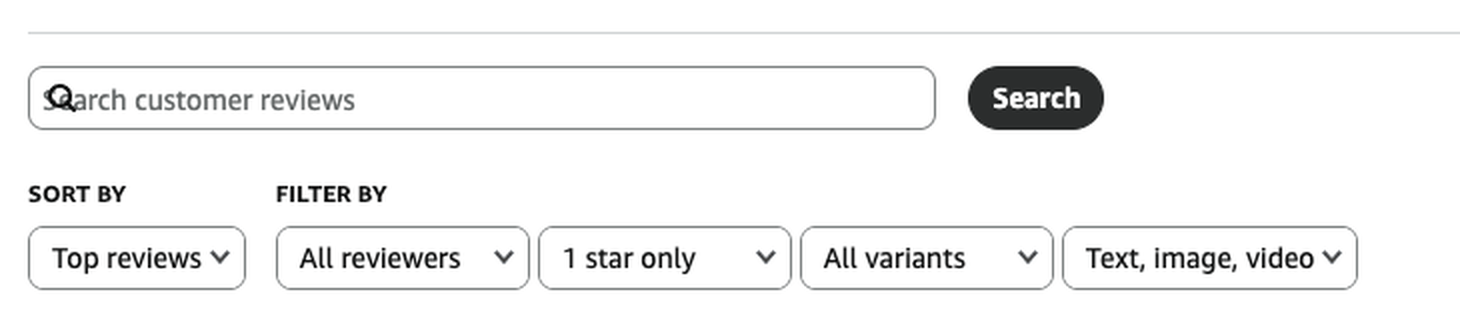
Pick the phrase carefully. “Does not work” appears in half the one-star reviews on any listing; a phrase like “the lid cracked on day three” appears in exactly one. The more specific the phrase, the clearer the answer.
Two filters in that same row make this faster. Set the star filter to the rating the review had, and if the product has variations, set the variant filter to all variants — more on that below.
The shortcut: open any listing from its ASIN
You rarely have the product URL to hand, but you always have the ASIN. Put it
straight after /dp/ and the listing opens:
amazon.com/dp/B0DEMO0001
Swap the domain for the marketplace you are checking: amazon.de/dp/…,
amazon.co.uk/dp/…, amazon.fr/dp/… and so on. The ASIN stays
the same across marketplaces, the domain does not.
It saves the detour through search every time, and it guarantees you land on the exact ASIN rather than a similar-looking one.
What makes a live review look gone
A handful of things produce a false result in both directions. These are the ones worth knowing before you conclude anything.
| What you see | What it can actually mean |
|---|---|
| The review is not in the list, but the rating count has not moved | Counts and the star average refresh on their own schedule. Give it time before treating the number as the evidence. |
| Gone on one variation, still there on another | Variations in a parent-child family can share reviews. Set the variant filter to all variants before concluding it is gone. |
| The link still works, but the review is not on the listing | Check the listing, not the link. What is visible to shoppers is the thing that affects you. |
| Nothing found, but you searched a common phrase | Search matches text. A generic phrase can fail to match even on a review that is still there. |
| You are logged in as the seller | Check in a private window. What you want to know is what a buyer sees, not what your account sees. |
The most common false alarm is the variant filter. A seller searches the review text on the ASIN they were watching, finds nothing, and reports it as removed — and it is sitting on a sibling variation of the same parent, still visible to anyone who opens the other size. Always widen the filter first.
How we document it on our side
For every review we report, the dashboard records what it was, which guideline it broke, when it was filed and when Amazon confirmed it gone. A removal carries a timestamp and the link that no longer resolves.
That record exists so you can audit it, not so you can take it on faith. Run either method above against any line in it — that is what it is there for, and it is the same check we run before anything is marked as removed.
Selling in more than one store? Then check each one. Reviews can be shared between marketplaces, and Amazon has never documented whether a removal travels with them. How Global Review Sharing works →
Frequently asked questions
How long after the removal can I check?
Straight away for the link, and usually within a few hours for the listing search. The rating count and star average are the slowest part and can lag behind by longer, so do not use the number as your evidence.
The review link still opens. Does that mean it was not removed?
Check the listing before concluding that. The link is the narrower test; what matters is whether the review still appears to shoppers on the product page. If it is gone from the listing but the link resolves, the listing is the answer that counts.
What should I search for if the review has no title?
Take the most unusual sentence in the body — a specific complaint, a number, a misspelling. Anything that would not appear in another review of the same product.
Does this work on every marketplace?
Yes. The review search box and the /dp/ shortcut exist on every Amazon marketplace. Only the domain changes, and the ASIN stays the same.
Why can I see the review but my colleague cannot?
Usually caching or a logged-in session. Compare in a private window on both sides. A logged-out view is the closest thing to what a buyer actually gets.
Can a removed review come back?
Removals under guideline enforcement are generally permanent. What does happen is that a reviewer posts a new review, which is a new review and not the old one returning.

Cueneyt has spent years inside Amazon seller accounts — first in account management at SellerVate, with more than 10,000 solved account cases, now in review removal with 5,000+ reviews taken down. These guides come out of what actually happens in those cases.
About Starfix.ai: Starfix.ai is a success-based Amazon review removal service. It reports only reviews that break Amazon’s Community Guidelines, through Amazon’s official channels, and charges only for reviews that are actually removed. Whether a review comes down is Amazon’s decision in each case.
Want to see which of yours qualify?
Paste one ASIN into the free review checker. We come back with how many of your critical reviews break a guideline — and you can verify every removal yourself afterwards.